
- Speech-to-text — changes your voice into text. This is the transcription step.
- Post-processing — an optional LLM step. The LLM removes filler words, adds punctuation, and formats the transcript after transcription.
Three ways to run a model
Every model — speech-to-text or post-processing — is in one of three groups:On-device
This model runs on your machine. Your audio never leaves your device. It works offline, and it costs nothing for each minute. This is the strongest privacy guarantee.
HyperWhisper Cloud
Built into the app. You need no API key and no separate account. This is the most accurate option. You pay for each minute of actual speech, with no markup.
Bring your own key
Add your own provider API key and pay that provider directly. This is useful if you have credits, or if you want a specific model.
There is no “best” model for all conditions. On-device models are the best choice for privacy and offline use. Cloud models are more accurate on accents, background noise, and technical vocabulary. The library lets you make this trade yourself.
Speech-to-text models
On-device
These models run on your machine and make no network calls. After you download a model (where applicable), it works offline. The app never uploads your audio. For more information, see Data Privacy.Whisper models
The general-purpose multilingual models from OpenAI. The VRAM values give the recommended GPU memory for full acceleration. With less memory, the model still runs on the CPU or on part of the GPU, but more slowly.The macOS build of most Whisper models is smaller than the Windows build of the same model. For example, Large v3 Turbo is 809 MB on macOS and 1.5 GB on Windows. Model Library shows the exact download size for your platform.
NVIDIA Parakeet models
NVIDIA Parakeet models are faster than Whisper models of an equivalent size. They are accurate for the languages that they support.
The Parakeet V3 language list is different on each platform. Each app ships its own export of the model, and the two exports do not carry the same languages.
On Windows, Parakeet runs on x64 and ARM64. Whisper runs on x64 only. Parakeet is the correct choice for a Snapdragon or ARM Windows device.
NVIDIA Nemotron 3.5 models
Nemotron 3.5 ASR from NVIDIA is the newest on-device option. macOS gets a broader variant, and Windows gets a smaller streaming variant. On macOS, Nemotron 3.5 is more accurate than the other local models, and it goes far beyond European languages. The macOS multilingual variant is the only local model that supports Chinese, Japanese, Korean, and Arabic.Apple Speech & Qwen3 ASR
- Apple Speech is built into macOS. There is no download, and it is available when you start the app. It is the fastest private option for daily Mac dictation. (It requires a recent macOS version.)
- Qwen3 ASR is an additional multilingual on-device model for users who want the ASR model from Alibaba. It runs on macOS and Windows, and it uses the sherpa-onnx daemon on Windows.
Offline language coverage
This table gives the best local model for the most common languages. For the full Parakeet V3 and Nemotron language lists, see the sections above.Whisper runs on macOS and Windows with the same language coverage. Parakeet, Nemotron, and Qwen3 ASR also run on both platforms, but their macOS and Windows variants are different. Parakeet V3 carries 25 languages on macOS and 26 on Windows, and the two lists do not match. The Nemotron and the Qwen3 ASR variants on Windows are smaller and support fewer languages. The sections above give the details.
HyperWhisper Cloud
HyperWhisper Cloud is built into the app. You need no API key and no separate account. It routes to top providers across three accuracy tiers, and you pay only for actual speech (silence and empty recordings cost 0 credits). HyperWhisper Cloud is the best choice when you want the highest accuracy with no setup.
HyperWhisper Cloud gives you all 12 supported provider engines with no key. The other providers are Soniox, OpenAI, AssemblyAI, Mistral Voxtral, Gemini, and Meta Muse Voice Transcribe. Only ElevenLabs, Grok, Deepgram, and Groq have automatic failover to a backup provider. The other providers have no automatic failover. For pricing, cost examples, and language guidance, see Providers.
Microsoft MAI-Transcribe 2
The Microsoft row of the Model picker gives two models. MAI-Transcribe 2 is a public preview model and the model that the row selects first. It costs approximately 1.67 credits per audio minute and it lists 60 languages. MAI-Transcribe 1.5 stays available at approximately 6.0 credits per minute with 42 languages. Both models are available through HyperWhisper Cloud only, and both accept custom vocabulary as a phrase list. Both models accept WAV, MP3, and FLAC files only, to a maximum of 300 MB. Read File Transcription for the automatic conversion that macOS applies. Microsoft documents speaker diarization and word-level timestamps for MAI-Transcribe 2, but HyperWhisper does not request them. Your transcript thus contains the text only.Meta Muse Voice Transcribe 1.0
Muse is available through HyperWhisper Cloud credits or with your own Meta Model API key. The Cloud route costs 3 credits per audio minute. The Model Library marks code switching, endpointing, context bias, language bias, turn-level timestamps, and speaker diarization as supported. It marks word-level timestamps as not supported. This capability record describes the model. HyperWhisper’s current batch path returns transcript text and does not show all turn metadata. Meta offers real-time streaming upstream, but HyperWhisper does not expose Muse in HyperWhisper Live. Read Providers for the complete record and the official Meta references.Bring your own key
You can use your own key if you hold API credits, if you want the free tier of a provider (Deepgram $200, AssemblyAI $50), or if you need a specific model. Add the key under API Keys. You pay the provider directly at the published rate. Supported providers for bring-your-own-key transcription: OpenAI · Groq · Deepgram · AssemblyAI · ElevenLabs · Mistral · Soniox · Google Gemini · Google Gemini 3.5 Transcribe · SpaceXAI (Grok)Google Gemini and Google Gemini 3.5 Transcribe are two different products of Google, on two different endpoints. Each has its own key slot in Model Library → API Keys. Gemini 3.5 Transcribe is a dedicated speech model, and it does not do post-processing. See API Keys.
When you use your own key, you are responsible to opt your audio out of model training. Each provider has its own setting. Data Privacy gives a prompt that you can copy to find the current opt-out for any provider.
Deepgram and AssemblyAI also expose medical-tuned model variants (Deepgram Nova-2 Medical and Nova-3 Medical, AssemblyAI Universal-2 Medical and Universal-3.5 Pro Medical) in the Model Library / Mode editor on both platforms, alongside their general-purpose models.The medical models support fewer languages than the general models. The two Deepgram medical models transcribe English only. The AssemblyAI medical models support English, German, Spanish, and French. The language picker does not show this limit, because it filters the languages by tier. Read Language & Detection.
Retired speech models
A provider can retire a speech model. HyperWhisper maps the model to a current model of the same provider. It usually removes the retired model from the Model Library and from the Mode editor. A retired row can stay for one release while the migration reaches saved modes. Your saved modes, your per-mode model settings, and your imported backups continue to work. The app applies the map when it reads the mode, thus you do not edit the mode yourself. Both platforms apply the map. The table gives the platform when only one platform has the model.
The three retired OpenAI rows remain in the picker for one release. They are
not promoted. New OpenAI modes use GPT Transcribe by default, and saved modes
move to the replacements in the table.
The Deepgram row covers the domain-tuned Nova-2 models (Meeting, Phone Call, Voicemail, Finance, Conversational AI, Automotive, Video) and every Enhanced, Base, and Whisper model. Nova 2 General and Nova 2 Medical are not retired.
The Google Chirp 3 row is different from the other rows. Chirp 3 was the Google engine of HyperWhisper Cloud, and Google Gemini 3.5 Transcribe replaced it. The app changes each saved mode one time, at the first start after the update. A mode that used Chirp 3 then uses Gemini 3.5 Transcribe, and it bills the rate of Gemini 3.5 Transcribe. Your imported backups get the same change.
HyperWhisper Cloud applies the same map on the server. If a request gives a retired AssemblyAI or Soniox model, the server transcribes with the replacement model and bills the rate of the replacement model.
Post-processing models
Post-processing is an optional second step. After transcription, an LLM removes filler words and corrects the punctuation and the capitalization. It also applies the formatting that your mode specifies. Post-processing is separate from the speech model, and you can combine any speech model with any post-processing model.Cloud post-processing
You can use cloud post-processing through HyperWhisper Cloud with no key, or with your own API key.
Every cloud post-processing model has a speed rating and an accuracy rating. The Rating scale section explains these ratings. They let you choose the trade that is important to you.
Gemini 3.8 Flash
Gemini 3.8 Flash is available for post-processing with your own Google Gemini API key and through HyperWhisper Cloud. The model appears in the Gemini model picker on macOS and Windows. On Linux, select it from the HyperWhisper Cloud model list, or entergemini-3.8-flash for Google Gemini with your own key. It
is not the default Gemini model, so select it explicitly when you want to use
it.
The app rates Gemini 3.8 Flash at 5 for accuracy and 2 for speed.
HyperWhisper Cloud disables reasoning for this model, because post-processing
needs text cleanup rather than a reasoning response. The Cloud route charges
for the input and output tokens. Its introductory rates are 3.75 per 1 million output tokens through December 31, 2026.
Gemini 3.8 Flash is a post-processing model. It is different from Gemini 3.5
Transcribe, which changes audio into text.
Retired post-processing models
A provider can retire a post-processing model. HyperWhisper then removes the model from the picker and maps it to a current model. Your saved modes continue to work. The app applies the map when it reads the mode, thus you do not edit the mode yourself. macOS and Windows use the same map. The replacement is always a model of the same provider, except for the local Gemma models. HyperWhisper does not move your mode to a different provider, and it does not change your API key.Local LLM post-processing
After you download them, the local Gemma 4 models clean and format the transcript text offline. Your text never leaves your device. A bundled llama.cpp server runs the local LLM, and this server starts automatically when the mode needs it. Platform availability:- macOS
- Windows
Local LLM post-processing runs on Apple Silicon Macs (M1 and later). The llama.cpp server uses Metal GPU acceleration. Intel Macs do not support local LLM post-processing. On an Intel Mac, use a cloud post-processing provider.The server listens on
127.0.0.1:37219, the loopback address of your Mac. No other machine can reach it. If a different program holds this port, the server cannot start, and post-processing fails. HyperWhisper does not select a different port.Rating scale
Every model in the library — speech-to-text and post-processing — shows a Speed bar and an Accuracy bar. Each bar has a rating from 1 to 5. The numbers come from an internal benchmark suite that runs over real recordings (results inbenchmarks/results/).
The Model Library sorts models by the sum of Speed + Accuracy, from high to low. Thus the most balanced models are at the top. If one rating is more important to you than the other, scroll past the top recommendations. There you can find a model that gives priority to speed or to quality.
Find a model in the library
The library holds every model: cloud and on-device, speech-to-text and post-processing. Use the search box and the filters at the top of Model Library to make the list shorter. Both platforms have the same set.
The language filter applies only to the voice models. The post-processing models always stay in the list, because they work on text and not on audio.
When you select a language, a count shows below the filters: for example
12 of 20 support Spanish. Click Show all to clear the language filter.
HyperWhisper remembers the Language filter and applies it the next time that you open the Model Library. It does not remember the other filters — they clear when you close the library.
How to use on-device models
Download and storage
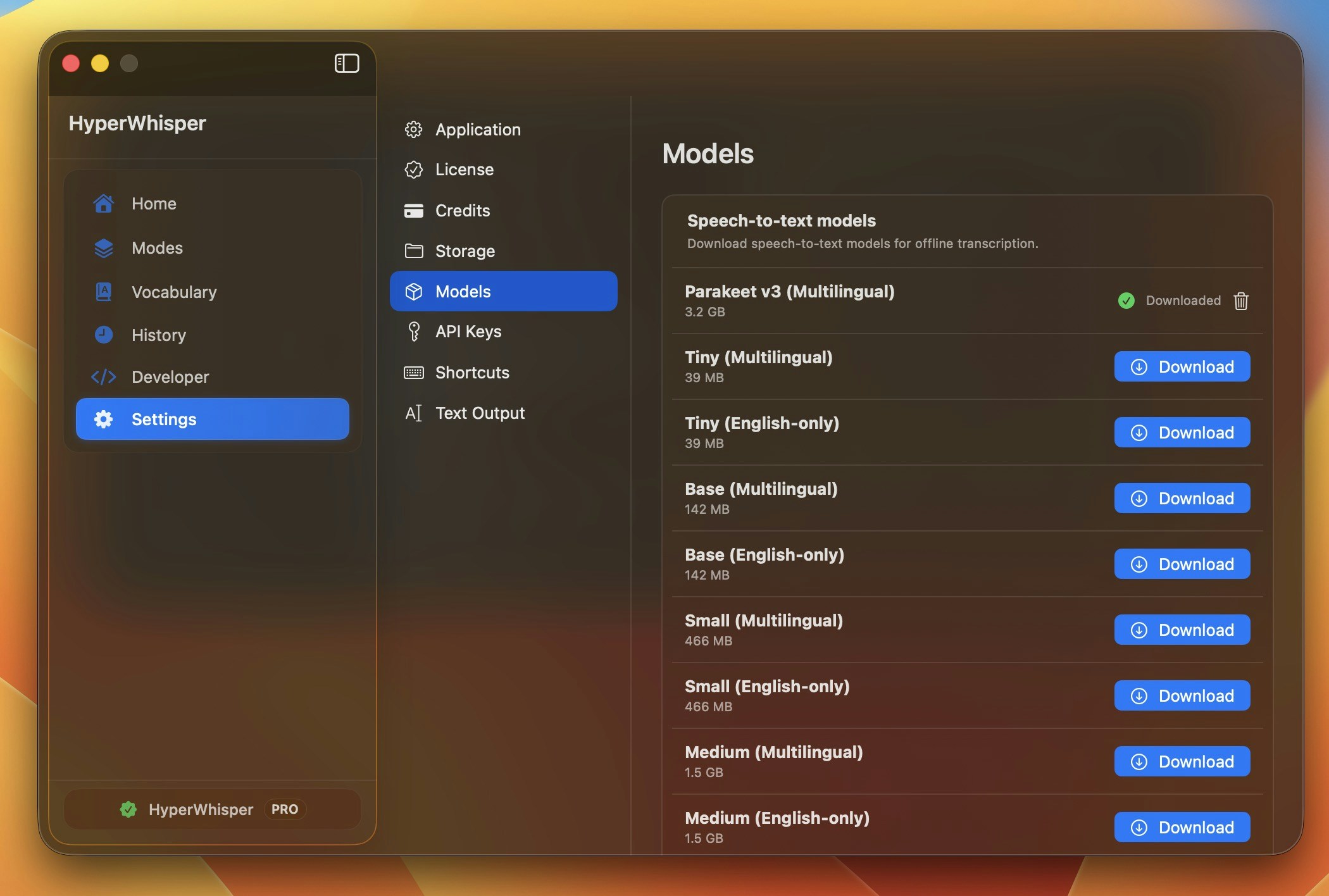
Open Model Library in the app. Click Download on a model. The circular indicator shows the progress. To stop the download, click the× button. Downloaded models stay on disk until you remove them.
Apple Speech is built into macOS and needs no download.
GPU vs CPU
Local engines use your GPU when one is available. If you have no dedicated GPU, or if the VRAM is not sufficient, the engine falls back to the CPU automatically. The model still runs, but more slowly.Remove models
To make disk space available, click the trash icon next to a downloaded model in Model Library. The app removes the file immediately. You can download the model again at any time.Which model to choose
Privacy is non-negotiable / offline
Choose an on-device speech model. Use Apple Speech for immediate Mac dictation, or Parakeet or Nemotron for higher accuracy. Your audio never leaves your machine.
I want the best accuracy, no setup
Choose HyperWhisper Cloud — Highest (ElevenLabs Scribe v2). You need no API key, and you pay only for speech.
I speak a non-European language, offline
Choose Nemotron 3.5 (Multilingual). It gives on-device coverage for Chinese, Japanese, Korean, Arabic, and approximately 30 languages in total.
Older laptop / no dedicated GPU
Choose Whisper Tiny or Small. These models run well on the CPU. For longer audio, change to HyperWhisper Cloud.
English only, want it fast & local
Choose Parakeet V2 (English). It is faster than the equivalent Whisper model, with comparable accuracy.
I already have a provider key
Choose Bring your own key. Add the key and pay the provider directly. See API Keys.
Boost accuracy on any model
- Custom vocabulary — add product names, technical terms, and the names of colleagues. This gives the largest improvement for technical or professional use. (Support is different for each model. Apple Speech and Whisper support it locally. Most cloud providers support it, but some do not.)
- Low-noise environment — background noise makes every model less accurate. See Best Practices.
- Natural pace — speech that is too fast or too slow decreases accuracy.
More information
Providers
HyperWhisper Cloud tiers, per-minute pricing, cost examples, and accuracy by language.
API Keys
Configure bring-your-own-key access for any supported provider.