
Local models let HyperWhisper transcribe fully offline — once a model is downloaded, audio never leaves your device and no internet connection is required to transcribe. HyperWhisper ships two families of speech-to-text models:Documentation Index
Fetch the complete documentation index at: https://hyperwhisper.com/docs/llms.txt
Use this file to discover all available pages before exploring further.
- Whisper — OpenAI’s general-purpose multilingual models, multiple sizes from Tiny to Large v3
- Parakeet — NVIDIA’s models, fast and accurate for English (v2) and 25 European languages (v3)
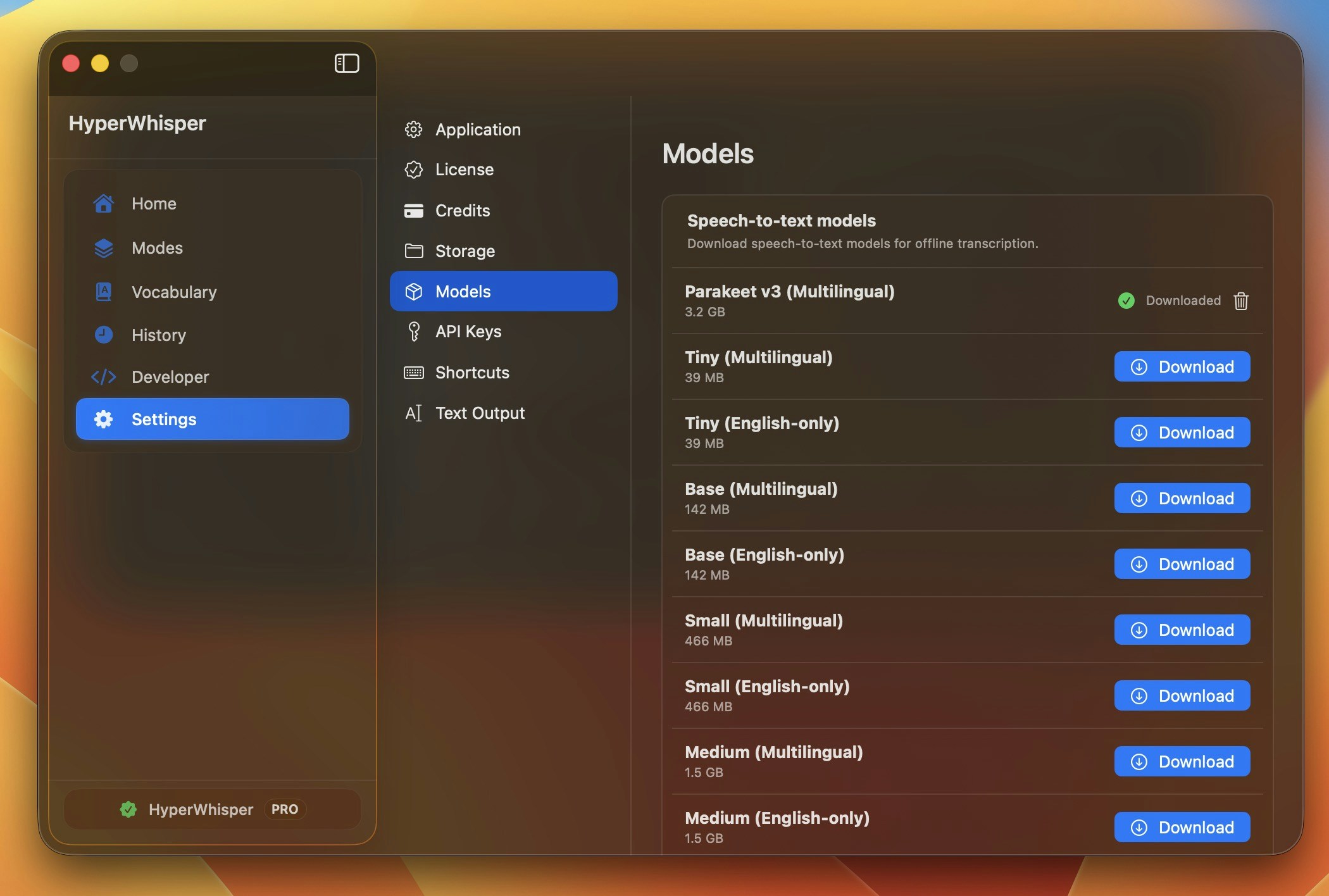
Downloading models
Open Model Management from the app, click Download on any entry, and watch the circular progress indicator. You can cancel mid-stream with the× button if needed. Downloaded models are stored on disk and stay there until you remove them.
| Platform | Storage location |
|---|---|
| Windows | %LOCALAPPDATA%\HyperWhisper\Models\ |
| macOS | ~/Library/Application Support/HyperWhisper/Models/ |
Does local mean offline?
Yes. After a model finishes downloading, HyperWhisper transcribes entirely on your machine with no network calls. This is the strongest privacy guarantee — your audio is never uploaded anywhere. See Data Privacy for details.GPU vs CPU
Local transcription engines use your GPU for acceleration when available, and fall back to CPU automatically if you don’t have a dedicated GPU or there isn’t enough VRAM. Local Gemma post-processing is available on Windows x64 only: it uses CUDA on NVIDIA GPUs and falls back to CPU on x64 AMD, Intel, non-GPU, or GPU-constrained systems.| Engine | Backend | GPU support | CPU fallback |
|---|---|---|---|
| Whisper (Windows) | WhisperNet / DirectCompute | NVIDIA, AMD, Intel (any DirectX 11 GPU) | Yes |
| Whisper (macOS) | libwhisper / Metal | Apple Silicon GPU + Neural Engine | Yes |
| Parakeet (Windows) | sherpa-onnx / DirectML | NVIDIA, AMD, Intel | Yes |
| Parakeet (macOS) | sherpa-onnx / CoreML | Apple Silicon | Yes |
| Local Gemma post-processing (Windows) | LLamaSharp / GGUF | NVIDIA CUDA only on x64 | Yes |
No dedicated GPU? Pick a Tiny or Base model and CPU transcription will still feel responsive on push-to-talk-length clips. For longer files, consider HyperWhisper Cloud instead — see Providers.
Whisper models
| Model | Size | Recommended VRAM | Languages | Best for |
|---|---|---|---|---|
| Tiny | 78 MB | ~1 GB | Multilingual | Lowest-end machines, quick drafts |
| Tiny (English) | 78 MB | ~1 GB | English only | Same as Tiny, slightly better English |
| Base | 148 MB | ~1 GB | Multilingual | Light hardware, basic dictation |
| Base (English) | 148 MB | ~1 GB | English only | Same as Base, slightly better English |
| Small | 488 MB | ~2 GB | Multilingual | Best balance for most users |
| Small (English) | 488 MB | ~2 GB | English only | Same as Small, slightly better English |
| Medium | 1.5 GB | ~5 GB | Multilingual | Higher accuracy, mid-range GPUs |
| Medium (English) | 1.5 GB | ~5 GB | English only | Same as Medium, slightly better English |
| Large v3 Turbo | 1.5 GB | ~6 GB | Multilingual | Near-Large accuracy, much faster |
| Large v2 | 3.1 GB | ~10 GB | Multilingual | Highest Whisper accuracy (older) |
| Large v3 | 3.1 GB | ~10 GB | Multilingual | Highest Whisper accuracy (latest) |
Parakeet models
NVIDIA Parakeet models are typically faster than equivalent-size Whisper models and very accurate for the languages they support.| Model | Size | Languages | Best for |
|---|---|---|---|
| Parakeet v2 (English) | 661 MB | English only | Fastest accurate English transcription |
| Parakeet v3 (Multilingual) | 671 MB | 25 European languages | Multilingual European dictation |
On Windows, Parakeet runs on both x64 and ARM64, while Whisper is currently x64-only. If you’re on a Snapdragon / ARM Windows device, choose Parakeet.
Local Gemma post-processing models
Local Gemma models clean up and format transcript text after transcription. They run offline after download, but they are separate from speech-to-text models and are currently available only in the Windows x64 app.| Model | Size | Recommended VRAM | Best for |
|---|---|---|---|
| Gemma 4 E2B (Q4_K_M) | 3.1 GB | ~4 GB | Recommended local cleanup model |
| Gemma 4 E4B (Q4_K_M) | 5.0 GB | ~6 GB | Higher quality local cleanup |
| Gemma 4 26B A4B MoE (UD-Q4_K_M) | 16.9 GB | ~18 GB | High-memory workstations |
| Gemma 4 31B Dense (Q4_K_M) | 18.3 GB | ~20 GB | Highest local quality, slowest |
On AMD and Intel GPUs, local Gemma post-processing uses CPU fallback in the current Windows build. Transcription can still use GPU acceleration independently.
Which model should I pick?
No dedicated GPU / older laptop
Whisper Tiny or Base — runs on CPU comfortably and still produces good transcripts for short dictation.
Modern desktop with mid-range GPU
Whisper Small (488 MB, ~2 GB VRAM) — the best balance of accuracy and speed for most users. This is the recommended default.
English-only and want speed
Parakeet v2 (English) — typically faster than Whisper Small with comparable English accuracy.
High-end GPU (RTX 3080+ / Apple Silicon Pro/Max)
Whisper Large v3 Turbo for speed, or Whisper Large v3 for maximum accuracy on noisy / accented audio.
When to switch to cloud instead
Local models are great for privacy, offline use, and zero per-minute cost. But cloud providers are noticeably more accurate than even the largest local Whisper model — especially for accented English, technical vocabulary, and noisy audio. If you find local accuracy isn’t cutting it, try a HyperWhisper Cloud tier — there’s no markup over the underlying provider and a Pro license includes 5,000 credits to start. See Providers for tiers and pricing.Boosting local accuracy
You can squeeze more accuracy out of any local model by:- Adding custom vocabulary for product names, jargon, and colleagues’ names
- Reducing background noise — see Best Practices
- Speaking at a natural pace (not too fast, not too slow)