> ## Documentation Index
> Fetch the complete documentation index at: https://hyperwhisper.com/docs/llms.txt
> Use this file to discover all available pages before exploring further.
# Models
> Every model HyperWhisper offers — speech-to-text and post-processing, on-device and cloud — and why each one exists. Pick by privacy, language coverage, speed, accuracy, and cost.
HyperWhisper doesn't lock you into one engine. It ships a **library** of models because no single model wins on everything — each trades off **privacy, language coverage, speed, accuracy, and cost** differently. This page lists everything on offer and explains *why* each one is there.
There are two kinds of model:
* **Speech-to-text** — turns your voice into text (the transcription step).
* **Post-processing** — an optional LLM pass that cleans up, punctuates, and formats the transcript afterwards.
You choose both in the app under **Model Library**, and per-mode in the [mode editor](/docs/transcription-modes).
 ## Three ways to run a model
Every model — speech or post-processing — falls into one of three buckets:
Runs entirely on your machine. Audio never leaves your device, works offline, and costs nothing per minute. The strongest privacy guarantee.
Built-in, no API key, no separate account. The most accurate option, billed per minute of **actual speech** with no markup.
Plug in your own provider API key and pay that provider directly — useful if you already have credits or want a specific model.
There is no universally "best" model. On-device models are unbeatable for privacy and offline use; cloud models are noticeably more accurate on accents, noise, and technical vocabulary. The library exists so you can make that trade yourself.
# Speech-to-text models
## On-device
These run locally with no network calls. Once downloaded (where applicable) they work fully offline — your audio is never uploaded anywhere. See [Data Privacy](/docs/data-privacy) for details.
| Model | Runs on | Languages | Why it's here |
| ----------------------- | ---------------- | ------------------------------------------------------ | -------------------------------------------------------------------------------------------------------------------------------------------------------- |
| **Apple Speech** | macOS (built-in) | Auto-detect | Zero download, instant, private. The fastest way to start dictating on a Mac with nothing to install. |
| **NVIDIA Parakeet** | macOS · Windows | English (V2) · 25 European (V3) | Fastest accurate on-device transcription for English and European languages. |
| **NVIDIA Nemotron 3.5** | macOS | 6 Latin · \~40 incl. Chinese, Japanese, Korean, Arabic | Best on-device accuracy and the **broadest offline language coverage** — the only local option that reaches beyond European languages. |
| **Whisper** | macOS · Windows | 100 languages | OpenAI's general-purpose model in many sizes (Tiny → Large). The universal fallback: runs on almost any hardware, including CPU-only and older machines. |
| **Qwen3 ASR** | macOS | Multilingual | An additional multilingual on-device option for users who want to try Alibaba's ASR model. |
### Whisper models
OpenAI's general-purpose multilingual models. The **VRAM** values are the recommended GPU memory for full acceleration — with less, the model still runs on CPU (or partial GPU), just slower.
| Model | Size | Recommended VRAM | Languages | Best for |
| ---------------- | ----------------------------------- | ---------------- | ---------------- | --------------------------------------- |
| Tiny | \~69 MB (macOS) / \~78 MB (Windows) | \~1 GB | Multilingual | Lowest-end machines, quick drafts |
| Tiny (English) | \~69 MB (macOS) / \~78 MB (Windows) | \~1 GB | English only | Same as Tiny, slightly better English |
| Base | 148 MB | \~1 GB | Multilingual | Light hardware, basic dictation |
| Base (English) | 148 MB | \~1 GB | English only | Same as Base, slightly better English |
| **Small** | **488 MB** | **\~2 GB** | **Multilingual** | **Best balance for most users** |
| Small (English) | 488 MB | \~2 GB | English only | Same as Small, slightly better English |
| Medium | 1.5 GB | \~5 GB | Multilingual | Higher accuracy, mid-range GPUs |
| Medium (English) | 1.5 GB | \~5 GB | English only | Same as Medium, slightly better English |
| Large v3 Turbo | 1.5 GB | \~6 GB | Multilingual | Near-Large accuracy, much faster |
| Large v2 | 3.1 GB | \~10 GB | Multilingual | Highest Whisper accuracy (older) |
| Large v3 | 3.1 GB | \~10 GB | Multilingual | Highest Whisper accuracy (latest) |
English-only variants (`.en`) use the same architecture trained only on English data. If you only ever dictate in English, they're slightly more accurate at the same size — but you lose multilingual support entirely.
### NVIDIA Parakeet models
NVIDIA Parakeet models are typically faster than equivalent-size Whisper models and very accurate for the languages they support.
| Model | Size | Languages | Best for |
| -------------------------- | ------ | --------------------- | -------------------------------------- |
| Parakeet V2 (English) | 474 MB | English only | Fastest accurate English transcription |
| Parakeet V3 (Multilingual) | 494 MB | 25 European languages | Multilingual European dictation |
Parakeet V3 covers: English, German, Spanish, French, Italian, Portuguese, Dutch, Polish, Russian, Ukrainian, Czech, Slovak, Hungarian, Romanian, Bulgarian, Croatian, Slovenian, Serbian, Danish, Swedish, Norwegian, Finnish, Estonian, Latvian, Lithuanian.
On Windows, Parakeet runs on both **x64 and ARM64**, while Whisper is currently x64-only. If you're on a Snapdragon / ARM Windows device, choose Parakeet.
### NVIDIA Nemotron 3.5 models
NVIDIA's Nemotron 3.5 ASR is the newest on-device option (macOS). It edges out the other local models on accuracy and reaches well beyond European languages — the multilingual variant is the only local model that handles Chinese, Japanese, Korean, and Arabic.
| Model | Size | Languages | Best for |
| --------------------------- | -------- | ------------------------------------------------------ | ------------------------------------------ |
| Nemotron 3.5 (Latin) | \~350 MB | English, Spanish, French, Italian, Portuguese, German | Smaller, faster Latin-script transcription |
| Nemotron 3.5 (Multilingual) | \~1.3 GB | \~40 languages incl. Chinese, Japanese, Korean, Arabic | Broadest offline language coverage |
Want non-European languages **offline**? **Nemotron 3.5 (Multilingual)** is the pick. Choose the **Latin** variant if you only speak English/Spanish/French/Italian/Portuguese/German and want it smaller and faster.
### Apple Speech & Qwen3 ASR
* **Apple Speech** is built into macOS — no download, available the moment you launch the app. It's the quickest private option for everyday Mac dictation. (Requires a recent macOS version.)
* **Qwen3 ASR** is an additional multilingual on-device model (macOS) for users who want to try Alibaba's ASR.
## Offline language coverage at a glance
Not sure which local model handles your language? This table maps the common use-cases. For the full Parakeet V3 and Nemotron language lists, see the sections above.
| Language / region | Best offline option | Also works |
| -------------------------------------------- | --------------------------------- | ------------------ |
| English | Parakeet V2 or V3, Nemotron Latin | Whisper (any size) |
| Spanish, French, Italian, Portuguese, German | Nemotron Latin, Parakeet V3 | Whisper |
| Other European (Polish, Czech, Dutch, etc.) | Parakeet V3 | Whisper |
| Chinese, Japanese, Korean, Arabic | **Nemotron Multilingual** | Whisper Large |
| 100-language general coverage | Whisper Large v3 | — |
| macOS, fastest start, no download | Apple Speech | — |
Nemotron is macOS-only. Parakeet and Whisper run on both macOS and Windows. See individual sections above for details.
## HyperWhisper Cloud
HyperWhisper Cloud is built-in — no API key, no separate account. It routes to best-in-class providers behind four accuracy tiers, and **you only pay for actual speech** (silence and empty recordings cost 0 credits). Use it when you want the highest accuracy without any setup.
| Tier | Powered by | Best for |
| ----------- | --------------------- | --------------------------------------------------------- |
| **Highest** | ElevenLabs Scribe v2 | Accents, noisy audio, technical vocabulary |
| **High** | Grok STT (xAI) | Solid multilingual accuracy at low cost |
| **Medium** | Deepgram Nova-3 | Strong English accuracy, low latency |
| **Fast** | Groq Whisper Large v3 | Sub-second latency for English & major European languages |
See [Providers](/docs/choosing-a-provider) for pricing, cost examples, and per-language guidance.
## Bring your own key
If you already hold API credits, want a provider's free tier (Deepgram \$200, AssemblyAI \$50), or need a specific model, plug in your own key under [API Keys](/docs/api-keys). You pay the provider directly at their published rate.
Supported providers for bring-your-own-key transcription:
**OpenAI · Groq · Deepgram · AssemblyAI · ElevenLabs · Mistral · Soniox · Google Gemini**
When you bring your own key, opting your audio out of model training is your responsibility — each provider has its own setting. See [Data Privacy](/docs/data-privacy) for a copy-pasteable prompt that finds the current opt-out for any provider.
# Post-processing models
Post-processing is an optional second step: after transcription, an LLM cleans up filler words, fixes punctuation and capitalization, and applies any formatting your [mode](/docs/transcription-modes) asks for. It's separate from the speech model — you can mix any speech model with any post-processing model.
## Cloud post-processing
Available built-in through HyperWhisper Cloud (no key needed) or with your own API key.
| Provider | Bring-your-own-key needed? | Character |
| ---------------------- | -------------------------- | ---------------------------------------------------- |
| **HyperWhisper Cloud** | No | Built-in, credit-based |
| **OpenAI** | Yes | GPT-4.1 and GPT-5 family; fast and accurate |
| **Anthropic (Claude)** | Yes | Claude Haiku and Sonnet; high quality reasoning |
| **Google Gemini** | Yes | Gemini Flash and Pro; efficient, multilingual |
| **Groq** | Yes | Ultra-fast inference via GPT OSS and Llama 4 models |
| **xAI (Grok)** | Yes | Grok 4.3; high-accuracy with low latency |
| **Cerebras** | Yes | Ultra-fast inference; GPT OSS, Qwen, and Z.ai models |
| **Mistral** | Yes | Multilingual-friendly; Mistral Small and Nemo |
Every cloud post-processing model is labeled with a **speed** and **accuracy** rating (explained in the [Rating scale](#rating-scale) section below) so you can pick the trade-off that matters to you.
## Local LLM post-processing
Local **Gemma 4** models clean up and format transcript text fully offline after download — your text never leaves your device. The local LLM is powered by a bundled **llama.cpp** server that starts automatically when the mode needs it.
**Platform availability:**
Local LLM post-processing is available on **Apple Silicon Macs** (M1 and later). The llama.cpp server runs via Metal GPU acceleration. Intel Macs do not support local LLM post-processing — cloud post-processing providers are available as an alternative.
| Model | Size | Recommended RAM | Best for |
| ----------------------------- | ---------- | --------------- | --------------------------------------------------- |
| **Gemma 4 E2B (Recommended)** | **3.1 GB** | **\~4 GB** | **Best balance of speed and quality for most Macs** |
| Gemma 4 E4B | 5 GB | \~6 GB | Higher quality cleanup |
| Gemma 4 12B | 7.1 GB | \~10 GB | Mid-size dense model, good for 16 GB Macs |
| Gemma 4 26B MoE | 16.9 GB | \~18 GB | Mixture-of-experts for capable machines |
| Gemma 4 31B Dense | 18.3 GB | \~20 GB | Highest local quality, slowest |
Local LLM post-processing is available on **Windows x64 and ARM64**. GPU acceleration uses NVIDIA CUDA when a compatible GPU is detected on x64; ARM64 and non-CUDA configurations fall back to CPU.
| Model | Size | Recommended VRAM | Best for |
| ----------------------------- | ---------- | ---------------- | ----------------------------------- |
| **Gemma 4 E2B (Recommended)** | **3.1 GB** | **\~4 GB** | **Recommended local cleanup model** |
| Gemma 4 E4B | 5 GB | \~6 GB | Higher quality local cleanup |
| Gemma 4 26B MoE | 16.9 GB | \~18 GB | High-memory workstations |
| Gemma 4 31B Dense | 18.3 GB | \~20 GB | Highest local quality, slowest |
On AMD and Intel GPUs, local Gemma post-processing uses CPU fallback in the current Windows build. Transcription can still use GPU acceleration independently.
## Rating scale
Every model in the library — speech-to-text and post-processing — shows a **Speed** bar and an **Accuracy** bar, each rated 1–5. The numbers come from an internal benchmark suite run over real recordings (results in `benchmarks/results/`).
| Rating | Speed (p50 latency) | Transcription accuracy (avg WER) | Post-processing accuracy (WER vs reference) |
| ------ | ------------------- | -------------------------------- | ------------------------------------------- |
| 5 | \< 700 ms | \< 5% | \< 8% |
| 4 | 700 ms – 2 s | 5 – 8% | 8 – 15% |
| 3 | 2 – 3.5 s | 8 – 12% | 15 – 25% |
| 2 | 3.5 – 5.5 s | 12 – 18% | 25 – 40% |
| 1 | > 5.5 s | > 18% | > 40% |
The Model Library sorts by the sum of Speed + Accuracy (descending) so the most balanced models float to the top. If you care more about one dimension than the other, you can scroll past the top recommendations to find a model that emphasizes speed or quality specifically.
A model with Speed 5, Accuracy 3 and one with Speed 3, Accuracy 5 land at the same rank. Look at the individual bars, not just the position in the list, when you have a strong preference.
# Using on-device models
## Downloading & storage
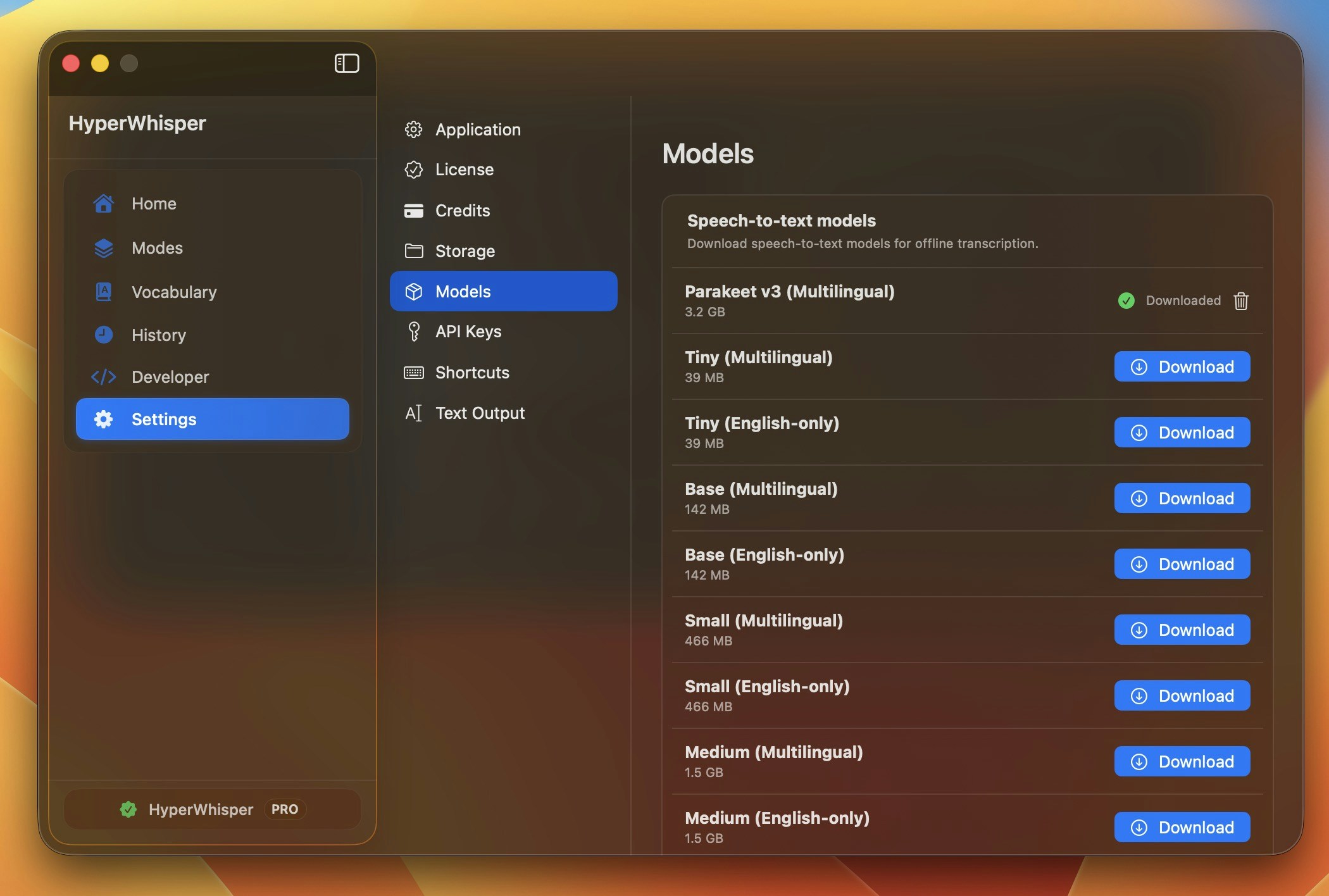
Open **Model Library** in the app, click **Download** on any entry, and watch the circular progress indicator. You can cancel mid-stream with the `×` button. Downloaded models stay on disk until you remove them.
| Platform | Storage location |
| -------- | ---------------------------------------------------- |
| Windows | `%LOCALAPPDATA%\HyperWhisper\Models\` |
| macOS | `~/Library/Application Support/hyperwhisper/models/` |
Apple Speech is built into macOS and needs no download.
## GPU vs CPU
Local engines use your GPU when available and **fall back to CPU automatically** if you don't have a dedicated GPU or there isn't enough VRAM. The model still runs on CPU — it's just slower.
| Engine | Backend | GPU support | CPU fallback |
| ------------------------------------- | -------------------------- | --------------------------------------- | ----------------------------- |
| Whisper (Windows) | WhisperNet / DirectCompute | NVIDIA, AMD, Intel (any DirectX 11 GPU) | Yes |
| Whisper (macOS) | libwhisper / Metal | Apple Silicon GPU + Neural Engine | Yes |
| Parakeet (Windows) | sherpa-onnx / DirectML | NVIDIA, AMD, Intel | Yes |
| Parakeet (macOS) | sherpa-onnx / CoreML | Apple Silicon | Yes |
| Nemotron (macOS) | FluidAudio / CoreML | Apple Silicon | Yes |
| Local Gemma post-processing (macOS) | llama.cpp / Metal | Apple Silicon (M1+) | No (Intel Macs not supported) |
| Local Gemma post-processing (Windows) | LLamaSharp / GGUF | NVIDIA CUDA (x64 only) | Yes (CPU — x64 and ARM64) |
## Removing models
To free up disk space, click the trash icon next to any downloaded model in Model Library. The file is removed immediately and can be re-downloaded any time.
# Which should I pick?
An **on-device** speech model. Apple Speech for instant Mac dictation, or **Parakeet** / **Nemotron** for higher accuracy. Audio never leaves your machine.
**HyperWhisper Cloud — Highest (ElevenLabs Scribe v2)**. No API key, pay only for speech.
**Nemotron 3.5 (Multilingual)** — on-device coverage for Chinese, Japanese, Korean, Arabic, and \~40 languages total.
**Whisper Tiny or Small** — runs comfortably on CPU. For longer audio, switch to HyperWhisper Cloud.
**Parakeet V2 (English)** — typically faster than equivalent Whisper with comparable accuracy.
**Bring your own key** — plug it in and pay the provider directly. See [API Keys](/docs/api-keys).
# Boost accuracy on any model
* **[Custom vocabulary](/docs/vocabulary)** — add product names, jargon, and colleagues' names. The single biggest improvement for technical or professional use. (Support varies by model — Apple Speech and Whisper support it locally; among cloud providers most do, a few don't.)
* **Low-noise environment** — every model degrades with background noise. See [Best Practices](/docs/best-practices).
* **Natural pace** — speech that's too fast or too slow both hurt accuracy.
# Go deeper
HyperWhisper Cloud tiers, per-minute pricing, cost examples, and accuracy by language.
Set up bring-your-own-key access for any supported provider.
## Three ways to run a model
Every model — speech or post-processing — falls into one of three buckets:
Runs entirely on your machine. Audio never leaves your device, works offline, and costs nothing per minute. The strongest privacy guarantee.
Built-in, no API key, no separate account. The most accurate option, billed per minute of **actual speech** with no markup.
Plug in your own provider API key and pay that provider directly — useful if you already have credits or want a specific model.
There is no universally "best" model. On-device models are unbeatable for privacy and offline use; cloud models are noticeably more accurate on accents, noise, and technical vocabulary. The library exists so you can make that trade yourself.
# Speech-to-text models
## On-device
These run locally with no network calls. Once downloaded (where applicable) they work fully offline — your audio is never uploaded anywhere. See [Data Privacy](/docs/data-privacy) for details.
| Model | Runs on | Languages | Why it's here |
| ----------------------- | ---------------- | ------------------------------------------------------ | -------------------------------------------------------------------------------------------------------------------------------------------------------- |
| **Apple Speech** | macOS (built-in) | Auto-detect | Zero download, instant, private. The fastest way to start dictating on a Mac with nothing to install. |
| **NVIDIA Parakeet** | macOS · Windows | English (V2) · 25 European (V3) | Fastest accurate on-device transcription for English and European languages. |
| **NVIDIA Nemotron 3.5** | macOS | 6 Latin · \~40 incl. Chinese, Japanese, Korean, Arabic | Best on-device accuracy and the **broadest offline language coverage** — the only local option that reaches beyond European languages. |
| **Whisper** | macOS · Windows | 100 languages | OpenAI's general-purpose model in many sizes (Tiny → Large). The universal fallback: runs on almost any hardware, including CPU-only and older machines. |
| **Qwen3 ASR** | macOS | Multilingual | An additional multilingual on-device option for users who want to try Alibaba's ASR model. |
### Whisper models
OpenAI's general-purpose multilingual models. The **VRAM** values are the recommended GPU memory for full acceleration — with less, the model still runs on CPU (or partial GPU), just slower.
| Model | Size | Recommended VRAM | Languages | Best for |
| ---------------- | ----------------------------------- | ---------------- | ---------------- | --------------------------------------- |
| Tiny | \~69 MB (macOS) / \~78 MB (Windows) | \~1 GB | Multilingual | Lowest-end machines, quick drafts |
| Tiny (English) | \~69 MB (macOS) / \~78 MB (Windows) | \~1 GB | English only | Same as Tiny, slightly better English |
| Base | 148 MB | \~1 GB | Multilingual | Light hardware, basic dictation |
| Base (English) | 148 MB | \~1 GB | English only | Same as Base, slightly better English |
| **Small** | **488 MB** | **\~2 GB** | **Multilingual** | **Best balance for most users** |
| Small (English) | 488 MB | \~2 GB | English only | Same as Small, slightly better English |
| Medium | 1.5 GB | \~5 GB | Multilingual | Higher accuracy, mid-range GPUs |
| Medium (English) | 1.5 GB | \~5 GB | English only | Same as Medium, slightly better English |
| Large v3 Turbo | 1.5 GB | \~6 GB | Multilingual | Near-Large accuracy, much faster |
| Large v2 | 3.1 GB | \~10 GB | Multilingual | Highest Whisper accuracy (older) |
| Large v3 | 3.1 GB | \~10 GB | Multilingual | Highest Whisper accuracy (latest) |
English-only variants (`.en`) use the same architecture trained only on English data. If you only ever dictate in English, they're slightly more accurate at the same size — but you lose multilingual support entirely.
### NVIDIA Parakeet models
NVIDIA Parakeet models are typically faster than equivalent-size Whisper models and very accurate for the languages they support.
| Model | Size | Languages | Best for |
| -------------------------- | ------ | --------------------- | -------------------------------------- |
| Parakeet V2 (English) | 474 MB | English only | Fastest accurate English transcription |
| Parakeet V3 (Multilingual) | 494 MB | 25 European languages | Multilingual European dictation |
Parakeet V3 covers: English, German, Spanish, French, Italian, Portuguese, Dutch, Polish, Russian, Ukrainian, Czech, Slovak, Hungarian, Romanian, Bulgarian, Croatian, Slovenian, Serbian, Danish, Swedish, Norwegian, Finnish, Estonian, Latvian, Lithuanian.
On Windows, Parakeet runs on both **x64 and ARM64**, while Whisper is currently x64-only. If you're on a Snapdragon / ARM Windows device, choose Parakeet.
### NVIDIA Nemotron 3.5 models
NVIDIA's Nemotron 3.5 ASR is the newest on-device option (macOS). It edges out the other local models on accuracy and reaches well beyond European languages — the multilingual variant is the only local model that handles Chinese, Japanese, Korean, and Arabic.
| Model | Size | Languages | Best for |
| --------------------------- | -------- | ------------------------------------------------------ | ------------------------------------------ |
| Nemotron 3.5 (Latin) | \~350 MB | English, Spanish, French, Italian, Portuguese, German | Smaller, faster Latin-script transcription |
| Nemotron 3.5 (Multilingual) | \~1.3 GB | \~40 languages incl. Chinese, Japanese, Korean, Arabic | Broadest offline language coverage |
Want non-European languages **offline**? **Nemotron 3.5 (Multilingual)** is the pick. Choose the **Latin** variant if you only speak English/Spanish/French/Italian/Portuguese/German and want it smaller and faster.
### Apple Speech & Qwen3 ASR
* **Apple Speech** is built into macOS — no download, available the moment you launch the app. It's the quickest private option for everyday Mac dictation. (Requires a recent macOS version.)
* **Qwen3 ASR** is an additional multilingual on-device model (macOS) for users who want to try Alibaba's ASR.
## Offline language coverage at a glance
Not sure which local model handles your language? This table maps the common use-cases. For the full Parakeet V3 and Nemotron language lists, see the sections above.
| Language / region | Best offline option | Also works |
| -------------------------------------------- | --------------------------------- | ------------------ |
| English | Parakeet V2 or V3, Nemotron Latin | Whisper (any size) |
| Spanish, French, Italian, Portuguese, German | Nemotron Latin, Parakeet V3 | Whisper |
| Other European (Polish, Czech, Dutch, etc.) | Parakeet V3 | Whisper |
| Chinese, Japanese, Korean, Arabic | **Nemotron Multilingual** | Whisper Large |
| 100-language general coverage | Whisper Large v3 | — |
| macOS, fastest start, no download | Apple Speech | — |
Nemotron is macOS-only. Parakeet and Whisper run on both macOS and Windows. See individual sections above for details.
## HyperWhisper Cloud
HyperWhisper Cloud is built-in — no API key, no separate account. It routes to best-in-class providers behind four accuracy tiers, and **you only pay for actual speech** (silence and empty recordings cost 0 credits). Use it when you want the highest accuracy without any setup.
| Tier | Powered by | Best for |
| ----------- | --------------------- | --------------------------------------------------------- |
| **Highest** | ElevenLabs Scribe v2 | Accents, noisy audio, technical vocabulary |
| **High** | Grok STT (xAI) | Solid multilingual accuracy at low cost |
| **Medium** | Deepgram Nova-3 | Strong English accuracy, low latency |
| **Fast** | Groq Whisper Large v3 | Sub-second latency for English & major European languages |
See [Providers](/docs/choosing-a-provider) for pricing, cost examples, and per-language guidance.
## Bring your own key
If you already hold API credits, want a provider's free tier (Deepgram \$200, AssemblyAI \$50), or need a specific model, plug in your own key under [API Keys](/docs/api-keys). You pay the provider directly at their published rate.
Supported providers for bring-your-own-key transcription:
**OpenAI · Groq · Deepgram · AssemblyAI · ElevenLabs · Mistral · Soniox · Google Gemini**
When you bring your own key, opting your audio out of model training is your responsibility — each provider has its own setting. See [Data Privacy](/docs/data-privacy) for a copy-pasteable prompt that finds the current opt-out for any provider.
# Post-processing models
Post-processing is an optional second step: after transcription, an LLM cleans up filler words, fixes punctuation and capitalization, and applies any formatting your [mode](/docs/transcription-modes) asks for. It's separate from the speech model — you can mix any speech model with any post-processing model.
## Cloud post-processing
Available built-in through HyperWhisper Cloud (no key needed) or with your own API key.
| Provider | Bring-your-own-key needed? | Character |
| ---------------------- | -------------------------- | ---------------------------------------------------- |
| **HyperWhisper Cloud** | No | Built-in, credit-based |
| **OpenAI** | Yes | GPT-4.1 and GPT-5 family; fast and accurate |
| **Anthropic (Claude)** | Yes | Claude Haiku and Sonnet; high quality reasoning |
| **Google Gemini** | Yes | Gemini Flash and Pro; efficient, multilingual |
| **Groq** | Yes | Ultra-fast inference via GPT OSS and Llama 4 models |
| **xAI (Grok)** | Yes | Grok 4.3; high-accuracy with low latency |
| **Cerebras** | Yes | Ultra-fast inference; GPT OSS, Qwen, and Z.ai models |
| **Mistral** | Yes | Multilingual-friendly; Mistral Small and Nemo |
Every cloud post-processing model is labeled with a **speed** and **accuracy** rating (explained in the [Rating scale](#rating-scale) section below) so you can pick the trade-off that matters to you.
## Local LLM post-processing
Local **Gemma 4** models clean up and format transcript text fully offline after download — your text never leaves your device. The local LLM is powered by a bundled **llama.cpp** server that starts automatically when the mode needs it.
**Platform availability:**
Local LLM post-processing is available on **Apple Silicon Macs** (M1 and later). The llama.cpp server runs via Metal GPU acceleration. Intel Macs do not support local LLM post-processing — cloud post-processing providers are available as an alternative.
| Model | Size | Recommended RAM | Best for |
| ----------------------------- | ---------- | --------------- | --------------------------------------------------- |
| **Gemma 4 E2B (Recommended)** | **3.1 GB** | **\~4 GB** | **Best balance of speed and quality for most Macs** |
| Gemma 4 E4B | 5 GB | \~6 GB | Higher quality cleanup |
| Gemma 4 12B | 7.1 GB | \~10 GB | Mid-size dense model, good for 16 GB Macs |
| Gemma 4 26B MoE | 16.9 GB | \~18 GB | Mixture-of-experts for capable machines |
| Gemma 4 31B Dense | 18.3 GB | \~20 GB | Highest local quality, slowest |
Local LLM post-processing is available on **Windows x64 and ARM64**. GPU acceleration uses NVIDIA CUDA when a compatible GPU is detected on x64; ARM64 and non-CUDA configurations fall back to CPU.
| Model | Size | Recommended VRAM | Best for |
| ----------------------------- | ---------- | ---------------- | ----------------------------------- |
| **Gemma 4 E2B (Recommended)** | **3.1 GB** | **\~4 GB** | **Recommended local cleanup model** |
| Gemma 4 E4B | 5 GB | \~6 GB | Higher quality local cleanup |
| Gemma 4 26B MoE | 16.9 GB | \~18 GB | High-memory workstations |
| Gemma 4 31B Dense | 18.3 GB | \~20 GB | Highest local quality, slowest |
On AMD and Intel GPUs, local Gemma post-processing uses CPU fallback in the current Windows build. Transcription can still use GPU acceleration independently.
## Rating scale
Every model in the library — speech-to-text and post-processing — shows a **Speed** bar and an **Accuracy** bar, each rated 1–5. The numbers come from an internal benchmark suite run over real recordings (results in `benchmarks/results/`).
| Rating | Speed (p50 latency) | Transcription accuracy (avg WER) | Post-processing accuracy (WER vs reference) |
| ------ | ------------------- | -------------------------------- | ------------------------------------------- |
| 5 | \< 700 ms | \< 5% | \< 8% |
| 4 | 700 ms – 2 s | 5 – 8% | 8 – 15% |
| 3 | 2 – 3.5 s | 8 – 12% | 15 – 25% |
| 2 | 3.5 – 5.5 s | 12 – 18% | 25 – 40% |
| 1 | > 5.5 s | > 18% | > 40% |
The Model Library sorts by the sum of Speed + Accuracy (descending) so the most balanced models float to the top. If you care more about one dimension than the other, you can scroll past the top recommendations to find a model that emphasizes speed or quality specifically.
A model with Speed 5, Accuracy 3 and one with Speed 3, Accuracy 5 land at the same rank. Look at the individual bars, not just the position in the list, when you have a strong preference.
# Using on-device models
## Downloading & storage
Open **Model Library** in the app, click **Download** on any entry, and watch the circular progress indicator. You can cancel mid-stream with the `×` button. Downloaded models stay on disk until you remove them.
| Platform | Storage location |
| -------- | ---------------------------------------------------- |
| Windows | `%LOCALAPPDATA%\HyperWhisper\Models\` |
| macOS | `~/Library/Application Support/hyperwhisper/models/` |
Apple Speech is built into macOS and needs no download.
## GPU vs CPU
Local engines use your GPU when available and **fall back to CPU automatically** if you don't have a dedicated GPU or there isn't enough VRAM. The model still runs on CPU — it's just slower.
| Engine | Backend | GPU support | CPU fallback |
| ------------------------------------- | -------------------------- | --------------------------------------- | ----------------------------- |
| Whisper (Windows) | WhisperNet / DirectCompute | NVIDIA, AMD, Intel (any DirectX 11 GPU) | Yes |
| Whisper (macOS) | libwhisper / Metal | Apple Silicon GPU + Neural Engine | Yes |
| Parakeet (Windows) | sherpa-onnx / DirectML | NVIDIA, AMD, Intel | Yes |
| Parakeet (macOS) | sherpa-onnx / CoreML | Apple Silicon | Yes |
| Nemotron (macOS) | FluidAudio / CoreML | Apple Silicon | Yes |
| Local Gemma post-processing (macOS) | llama.cpp / Metal | Apple Silicon (M1+) | No (Intel Macs not supported) |
| Local Gemma post-processing (Windows) | LLamaSharp / GGUF | NVIDIA CUDA (x64 only) | Yes (CPU — x64 and ARM64) |
## Removing models
To free up disk space, click the trash icon next to any downloaded model in Model Library. The file is removed immediately and can be re-downloaded any time.
# Which should I pick?
An **on-device** speech model. Apple Speech for instant Mac dictation, or **Parakeet** / **Nemotron** for higher accuracy. Audio never leaves your machine.
**HyperWhisper Cloud — Highest (ElevenLabs Scribe v2)**. No API key, pay only for speech.
**Nemotron 3.5 (Multilingual)** — on-device coverage for Chinese, Japanese, Korean, Arabic, and \~40 languages total.
**Whisper Tiny or Small** — runs comfortably on CPU. For longer audio, switch to HyperWhisper Cloud.
**Parakeet V2 (English)** — typically faster than equivalent Whisper with comparable accuracy.
**Bring your own key** — plug it in and pay the provider directly. See [API Keys](/docs/api-keys).
# Boost accuracy on any model
* **[Custom vocabulary](/docs/vocabulary)** — add product names, jargon, and colleagues' names. The single biggest improvement for technical or professional use. (Support varies by model — Apple Speech and Whisper support it locally; among cloud providers most do, a few don't.)
* **Low-noise environment** — every model degrades with background noise. See [Best Practices](/docs/best-practices).
* **Natural pace** — speech that's too fast or too slow both hurt accuracy.
# Go deeper
HyperWhisper Cloud tiers, per-minute pricing, cost examples, and accuracy by language.
Set up bring-your-own-key access for any supported provider.